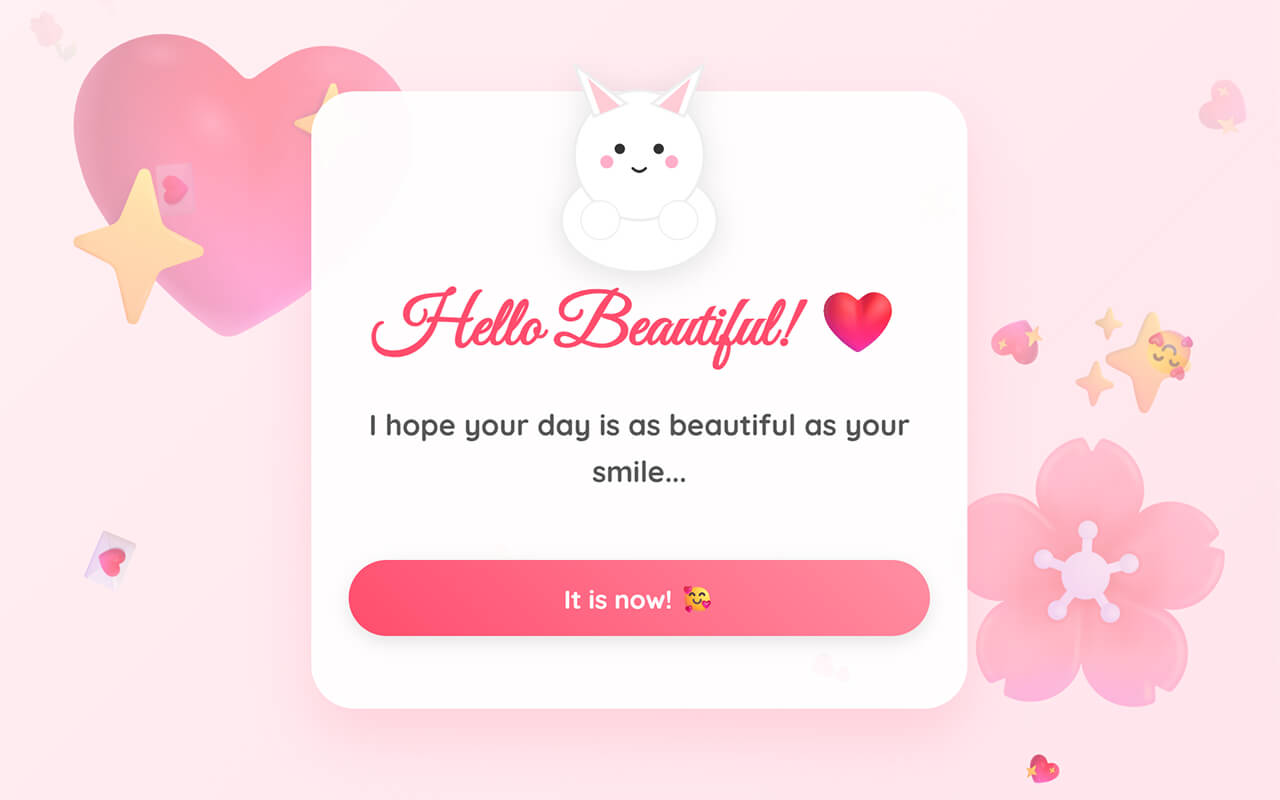
Valentine’s Day is just around the corner, and what better way to celebrate than by creating something special and fun? Whether you want to surprise your crush, express your feelings, or simply practice your coding skills, this Valentine’s Day game is the perfect project.
In this tutorial, we’ll build an interactive Valentine’s game from scratch using HTML, CSS, and JavaScript. The game features a cute animated cat, romantic messages, floating hearts, and a fun “Be My Valentine?” question with a playful twist. The “No” button runs away when you try to click it!
This Valentine game is built entirely with vanilla HTML, CSS, and JavaScript. No frameworks or libraries required. So it’s perfect if you’re learning front-end development or want to improve your JavaScript skills with a hands-on project.
Why Build A Valentine’s Day Game?
If you’re working on a personal project, want to surprise someone special, or simply looking for a fun coding challenge, this Valentine’s Day game is incredibly useful. Here’s why it’s a great beginner-friendly project:
- JavaScript Practice: Learn how to manipulate DOM elements, add event listeners, create animations, and handle user interactions dynamically.
- CSS Animations: Implementing smooth transitions and animations helps you understand keyframes, transforms, and how to create engaging visual effects.
- Creative Coding: You’ll practice combining logic with design to create an interactive experience that’s both functional and visually appealing.
- Real-World Application: Interactive games and experiences are common on the web. You’ll walk away with practical skills you can reuse in other projects like quizzes, surveys, or interactive landing pages.
Steps to Create Valentine’s Day Game in HTML, CSS & JavaScript
To build your Valentine’s Day game with HTML, CSS, and JavaScript, follow these easy steps:
- Create Your Project Folder: Start by creating a new folder for your project. Name it something like valentine-game.
- Set Up Your Files: Inside the folder, create three files:
index.html,styles.css, andscript.js. - Add Google Fonts: We’ll use beautiful fonts to make our game look romantic and appealing. We’re using “Great Vibes” for the headings and “Quicksand” for the body text.
Step 1: Create the HTML Structure
Paste the following HTML code into your index.html to create the game structure. It includes a card with an animated cat, multiple steps with romantic messages, and interactive buttons that guide users through the experience.
<!doctype html>
<html lang="en">
  <head>
    <meta charset="UTF-8" />
    <meta name="viewport" content="width=device-width, initial-scale=1.0, maximum-scale=1.0, user-scalable=no" />
    <title>Be My Valentine? </title>
    <link rel="preconnect" href="https://fonts.googleapis.com" />
    <link rel="preconnect" href="https://fonts.gstatic.com" crossorigin />
    <link href="https://fonts.googleapis.com/css2?family=Great+Vibes&family=Quicksand:wght@500;700&display=swap" rel="stylesheet" />
    <link rel="stylesheet" href="styles.css" />
  </head>
  <body>
    <!-- Background Big Emojis -->
    <div class="bg-element bg-1"></div>
    <div class="bg-element bg-2"></div>
    <div class="bg-element bg-3">✨</div>

    <div class="card">
      <!-- Cat Area -->
      <div class="cat-container cat" id="cat">
        <div class="heart-bubble"></div>
        <div class="tear"></div>
        <svg class="cat-svg" viewBox="0 0 200 180" xmlns="http://www.w3.org/2000/svg">
          <!-- Body -->
          <ellipse cx="100" cy="140" rx="60" ry="40" fill="#fff" stroke="#eee" stroke-width="2" />
          <!-- Head -->
          <circle cx="100" cy="90" r="50" fill="#fff" stroke="#eee" stroke-width="2" />
          <!-- Ears -->
          <path d="M65 60 L50 20 L90 50 Z" fill="#fff" stroke="#eee" stroke-width="2" />
          <path d="M135 60 L150 20 L110 50 Z" fill="#fff" stroke="#eee" stroke-width="2" />
          <path d="M70 58 L60 30 L85 52 Z" fill="#ffccd5" />
          <path d="M130 58 L140 30 L115 52 Z" fill="#ffccd5" />
          <!-- Cheeks -->
          <circle class="feature cheeks" cx="75" cy="95" r="5" fill="#ffaec9" opacity="0.6" />
          <circle class="feature cheeks" cx="125" cy="95" r="5" fill="#ffaec9" opacity="0.6" />
          <!-- Face Features Groups -->
          <g class="feature eye-normal">
            <circle cx="85" cy="85" r="4" fill="#333" />
            <circle cx="115" cy="85" r="4" fill="#333" />
          </g>
          <g class="feature eye-happy">
            <path d="M78 85 Q85 80 92 85" fill="none" stroke="#333" stroke-width="2" stroke-linecap="round" />
            <path d="M108 85 Q115 80 122 85" fill="none" stroke="#333" stroke-width="2" stroke-linecap="round" />
          </g>
          <g class="feature eye-wide">
            <circle cx="85" cy="85" r="6" fill="#333" />
            <circle cx="115" cy="85" r="6" fill="#333" />
            <circle cx="87" cy="83" r="2" fill="white" />
            <circle cx="117" cy="83" r="2" fill="white" />
          </g>
          <path class="feature mouth-normal" d="M95 100 Q100 105 105 100" stroke="#333" stroke-width="2" fill="none" stroke-linecap="round" />
          <circle class="feature mouth-open" cx="100" cy="103" r="4" fill="#333" />
          <!-- Paws holding edge -->
          <circle cx="70" cy="140" r="15" fill="#fff" stroke="#eee" />
          <circle cx="130" cy="140" r="15" fill="#fff" stroke="#eee" />
        </svg>
      </div>

      <!-- Step 1: Greeting -->
      <div class="step active" id="step1">
        <h1>Hello Beautiful! ❤️</h1>
        <p>I hope your day is as beautiful as your smile...</p>
        <div class="btn-group">
          <button class="btn btn-primary" onclick="nextStep(2)">It is now! </button>
        </div>
      </div>

      <!-- Step 2: Quote 1 -->
      <div class="step" id="step2">
        <h1>Just for you...</h1>
        <p>"If I had a flower for every time I thought of you, I could walk through my garden forever."</p>
        <div class="btn-group">
          <button class="btn btn-primary" onclick="nextStep(3)">That's so sweet! </button>
        </div>
      </div>

      <!-- Step 3: Happy Place -->
      <div class="step" id="step3">
        <h1>My Happy Place...</h1>
        <p>They say home isn't a place, it's a feeling.<br />And honestly? <br />Home is wherever you are.</p>
        <div class="btn-group">
          <button class="btn btn-primary" onclick="nextStep(4)">Aw, stop! </button>
        </div>
      </div>

      <!-- Step 4: World -->
      <div class="step" id="step4">
        <h1>You are my world...</h1>
        <p>Everything is better when you're around.<br />You're the missing piece I didn't know I needed.</p>
        <div class="btn-group">
          <button class="btn btn-primary" onclick="nextStep(5)">Tell me more... </button>
        </div>
      </div>

      <!-- Step 5: Little Things -->
      <div class="step" id="step5">
        <h1>The Little Things</h1>
        <p>I love the way you laugh, the way you smile, and just... everything about you.<br />You are perfect to me.</p>
        <div class="btn-group">
          <button class="btn btn-primary" onclick="nextStep(6)">Start Question! </button>
        </div>
      </div>

      <!-- Step 6: Promise -->
      <div class="step" id="step6">
        <h1>One Question...</h1>
        <p>I have something very important to ask you...<br />Please answer from your heart? ❤️</p>
        <div class="btn-group">
          <button class="btn btn-primary" onclick="nextStep(7)">I Promise </button>
        </div>
      </div>

      <!-- Step 7: Question -->
      <div class="step" id="step7">
        <h1>Be My Valentine?</h1>
        <p>Will you do me the honor? </p>
        <div class="btn-group">
          <button class="btn btn-primary" id="yesBtn" onclick="acceptLove()">YES! </button>
          <button class="btn btn-secondary" id="noBtn">No...</button>
        </div>
      </div>

      <!-- Step 8: Success -->
      <div class="step" id="step8">
        <h1 style="font-size: 3.5rem">YAYY!! </h1>
        <p>You have no idea how happy this makes me! <br />I Love You! ❤️</p>
        <div class="btn-group">
          <button class="btn btn-primary" onclick="location.reload()">Replay </button>
        </div>
      </div>
    </div>

    <script src="script.js"></script>
  </body>
</html>
This HTML creates a clean, organized layout with:
- A responsive card that holds all content
- An animated SVG cat with different moods
- Multiple steps (greeting, quotes, question, success)
- Interactive buttons for navigation
- Background floating emojis for visual appeal
The structure uses semantic HTML with clear class names, making it easy to style and manipulate with CSS and JavaScript.
Step 2: Style the Game with CSS
Paste the following CSS code into your styles.css to style the Valentine’s game. It uses CSS variables for easy customization, flexbox for layout, and keyframe animations for smooth, engaging effects. The styles also ensure the game looks great on all devices.
:root {
  --primary: #ff4d6d;
  --secondary: #ff8fa3;
  --bg-gradient: linear-gradient(135deg, #fff0f3 0%, #ffe5ec 100%);
  --glass: rgba(255, 255, 255, 0.95);
  --shadow: 0 20px 40px rgba(255, 77, 109, 0.15);
  --text-color: #555;
}

* {
  margin: 0;
  padding: 0;
  box-sizing: border-box;
  -webkit-tap-highlight-color: transparent;
}

body {
  font-family: "Quicksand", sans-serif;
  background: var(--bg-gradient);
  height: 100vh;
  width: 100vw;
  display: flex;
  justify-content: center;
  align-items: center;
  overflow: hidden;
  position: relative;
}

/* Big Background Elements */
.bg-element {
  position: absolute;
  opacity: 0.4;
  animation: float 15s infinite ease-in-out;
  z-index: 0;
  pointer-events: none;
  font-size: 8rem;
}
.bg-1 {
  top: -5%;
  left: 0;
  font-size: 15rem;
  color: #ffccd5;
  animation-delay: 0s;
}
.bg-2 {
  bottom: 5%;
  right: 0;
  font-size: 12rem;
  color: #ffb3c1;
  animation-delay: -5s;
}
.bg-3 {
  top: 40%;
  right: 5%;
  font-size: 5rem;
  color: #fff;
  animation-delay: -2s;
}

@keyframes float {
  0%,
  100% {
    transform: translateY(0) rotate(0deg);
  }
  50% {
    transform: translateY(-30px) rotate(5deg);
  }
}

/* Continuous Floating Love Emojis */
.floating-emoji {
  position: absolute;
  bottom: -50px;
  font-size: 24px;
  animation: floatUp linear forwards;
  pointer-events: none;
  z-index: 1;
  opacity: 0.6;
}

@keyframes floatUp {
  0% {
    transform: translateY(0) rotate(0deg);
    opacity: 0;
  }
  10% {
    opacity: 0.8;
  }
  100% {
    transform: translateY(-110vh) rotate(360deg);
    opacity: 0;
  }
}

/* Main Glass Card */
.card {
  background: var(--glass);
  border-radius: 30px;
  box-shadow: var(--shadow);
  width: 90%;
  max-width: 450px;
  padding: 2rem 1.5rem;
  text-align: center;
  position: relative;
  z-index: 10;
  display: flex;
  flex-direction: column;
  align-items: center;
  border: 2px solid rgba(255, 255, 255, 0.8);
  transition: transform 0.3s ease;
}

/* Cat Container */
.cat-container {
  width: 180px;
  height: 160px;
  margin: -70px auto 10px;
  position: relative;
  z-index: 20;
}

.cat-svg {
  width: 100%;
  height: 100%;
  filter: drop-shadow(0 5px 10px rgba(0, 0, 0, 0.1));
  transition: transform 0.3s ease;
  animation: breathe 3s ease-in-out infinite;
}
@keyframes breathe {
  0%,
  100% {
    transform: scale(1);
  }
  50% {
    transform: scale(1.02);
  }
}

/* --- Mood Transitions (CSS) --- */
/* Smooth transitions for features */
.feature {
  transition:
    opacity 0.3s ease,
    transform 0.3s ease,
    fill 0.3s ease;
}

/* FIX: Ensure cheeks always scale from their own center effectively */
.cheeks {
  transform-box: fill-box;
  transform-origin: center;
}

/* Defaults: Show normal eyes/mouth, hide others */
.eye-happy,
.eye-wide,
.mouth-open,
.blush-strong {
  opacity: 0;
}
.eye-normal,
.mouth-normal,
.cheeks {
  opacity: 1;
}

/* MOOD: Blush / Cute (Step 2, 5) */
.cat[data-mood="cute"] .eye-normal {
  opacity: 0;
}
.cat[data-mood="cute"] .eye-happy {
  opacity: 1;
}
.cat[data-mood="cute"] .cheeks {
  fill: #ff5d8f;
  opacity: 0.8;
  transform: scale(1.2);
}

/* MOOD: Surprised / Shocked (Step 4) */
.cat[data-mood="shocked"] .eye-normal {
  opacity: 0;
}
.cat[data-mood="shocked"] .eye-wide {
  opacity: 1;
}
.cat[data-mood="shocked"] .mouth-normal {
  opacity: 0;
}
.cat[data-mood="shocked"] .mouth-open {
  opacity: 1;
}
.cat[data-mood="shocked"] .cat-svg {
  animation: bounce 0.4s infinite alternate;
}

/* MOOD: Love (Step 3, 8, Yes) */
.cat[data-mood="love"] .heart-bubble {
  opacity: 1;
  transform: scale(1) rotate(15deg);
}
.cat[data-mood="love"] .eye-normal {
  opacity: 0;
}
.cat[data-mood="love"] .eye-happy {
  opacity: 1;
}
.cat[data-mood="love"] .cheeks {
  fill: #ff4d6d;
  opacity: 1;
}

/* MOOD: Sad (No Button) */
.cat[data-mood="sad"] .tear {
  opacity: 1;
  animation: cry 1.5s infinite;
}

/* MOOD: Excited (Success) */
.cat[data-mood="excited"] .cat-svg {
  animation: dance 0.5s infinite alternate;
}
@keyframes dance {
  from {
    transform: rotate(-5deg);
  }
  to {
    transform: rotate(5deg);
  }
}
@keyframes bounce {
  to {
    transform: translateY(-8px);
  }
}

/* Extra Elements */
.tear {
  position: absolute;
  width: 8px;
  height: 8px;
  background: #4dacff;
  border-radius: 50%;
  top: 65px;
  left: 45px;
  opacity: 0;
  transition: opacity 0.3s;
}
@keyframes cry {
  0% {
    transform: translateY(0);
    opacity: 1;
  }
  100% {
    transform: translateY(20px);
    opacity: 0;
  }
}

.heart-bubble {
  position: absolute;
  top: 0;
  right: 20px;
  font-size: 2rem;
  opacity: 0;
  transform: scale(0);
  transition: all 0.3s;
}

/* Typography */
h1 {
  font-family: "Great Vibes", cursive;
  color: var(--primary);
  font-size: 3rem;
  line-height: 1.2;
  margin-bottom: 0.5rem;
  text-shadow: 2px 2px 0 rgba(255, 255, 255, 0.5);
}

p {
  color: var(--text-color);
  font-size: 1.25rem;
  line-height: 1.6;
  margin-bottom: 2rem;
  font-weight: 600;
  min-height: 4.5em;
  display: flex;
  align-items: center;
  justify-content: center;
  flex-direction: column;
}

.quote-style {
  font-style: italic;
  color: #ff758c;
  font-weight: 500;
  font-size: 1.1rem;
  margin-top: 0.5rem;
  display: block;
}

/*  Buttons */
.btn-group {
  display: flex;
  gap: 15px;
  justify-content: center;
  width: 100%;
  flex-wrap: wrap;
  margin-top: auto;
  padding-bottom: 1rem;
}

.btn {
  padding: 14px 28px;
  font-family: inherit;
  font-weight: 700;
  font-size: 1.1rem;
  border-radius: 50px;
  border: none;
  cursor: pointer;
  transition:
    transform 0.2s cubic-bezier(0.34, 1.56, 0.64, 1),
    box-shadow 0.2s ease;
  box-shadow: 0 4px 12px rgba(0, 0, 0, 0.1);
  z-index: 100;
}

.btn:hover {
  transform: scale(1.05); /* Slightly bigger on hover */
  box-shadow: 0 6px 15px rgba(0, 0, 0, 0.15);
}

.btn:active {
  transform: scale(0.95);
}

.btn-primary {
  background: linear-gradient(45deg, var(--primary), var(--secondary));
  color: white;
  flex: 1;
  min-width: 140px;
}

.btn-secondary {
  background: white;
  color: var(--primary);
  border: 2px solid var(--secondary);
  flex: 0;
  min-width: 110px;
}

/* Steps */
.step {
  display: none;
  width: 100%;
  height: 100%;
  flex-direction: column;
  animation: fadeIn 0.8s ease-out;
}
.step.active {
  display: flex;
}

@keyframes fadeIn {
  from {
    opacity: 0;
    transform: translateY(10px);
  }
  to {
    opacity: 1;
    transform: translateY(0);
  }
}

/* Sparkles */
.sparkle {
  position: fixed;
  width: 10px;
  height: 10px;
  background-color: var(--primary);
  top: -10px;
  z-index: 9999;
  animation: fall linear forwards;
  pointer-events: none;
}
@keyframes fall {
  to {
    transform: translateY(110vh) rotate(720deg);
  }
}
This CSS creates the visual magic with:
- CSS Variables: Easy-to-customize color scheme and design tokens
- Glassmorphism: Modern glass-effect card with backdrop blur
- Animations: Floating elements, breathing effects, and smooth transitions
- Cat Moods: Different facial expressions triggered by data attributes
- Responsive Design: The game looks perfect on all screen sizes
- Button Styles: Gradient primary buttons and outlined secondary buttons
The animations bring the game to life, with floating hearts, breathing effects on the cat, and smooth transitions between different states.
Step 3: Add Interactivity with JavaScript
Paste the following JavaScript code into your script.js to add game functionality. It handles step navigation, cat mood changes, the dodging “No” button, success celebrations with sparkles, and continuous floating emojis in the background.
// Cat & Moods
const cat = document.getElementById("cat");
function setMood(mood) {
  cat.removeAttribute("data-mood");
  if (mood) cat.setAttribute("data-mood", mood);
}

// Step Navigation with Custom Moods per Step
function nextStep(id) {
  document.querySelectorAll(".step").forEach((s) => s.classList.remove("active"));
  document.getElementById("step" + id).classList.add("active");

  // Reset transform
  const catSvg = cat.querySelector("svg");
  catSvg.style.transform = "none";

  // Mood Mapping
  if (id === 2) {
    setMood("cute"); // Smiling eyes
    catSvg.style.transform = "rotate(-5deg)";
  } else if (id === 3) {
    setMood("love"); // Heart bubble
  } else if (id === 4) {
    setMood("shocked"); // Wide eyes because "you are my world"
  } else if (id === 5) {
    setMood("cute"); // Laugh/smile -> simple cute
    catSvg.style.transform = "translateY(5px)";
  } else if (id === 6) {
    setMood("shocked"); // A bit serious/nervous (reusing shocked for wide eyes)
    catSvg.style.transform = "none";
  } else if (id === 7) {
    setMood("default"); // Earnest
    catSvg.style.transform = "translateY(8px)"; // Peeking up
  } else {
    setMood(""); // Default happy/normal
  }
}

// No Button Dodge Logic
const noBtn = document.getElementById("noBtn");
const yesBtn = document.getElementById("yesBtn");
let noCount = 0;
const noTexts = ["No? ", "Are you sure?", "Please? ", "Don't do this!", "Think again!", "Heartbreaker! "];

function dodgeBtn(e) {
  if (e.type === "touchstart") e.preventDefault();

  const margin = 20;
  const maxX = window.innerWidth - noBtn.offsetWidth - margin;
  const maxY = window.innerHeight - noBtn.offsetHeight - margin;

  const randomX = Math.max(margin, Math.random() * maxX);
  const randomY = Math.max(margin, Math.random() * maxY);

  noBtn.style.position = "fixed";
  noBtn.style.left = randomX + "px";
  noBtn.style.top = randomY + "px";

  noBtn.innerText = noTexts[noCount % noTexts.length];
  noCount++;

  setMood("sad");
  setTimeout(() => setMood(""), 1500);
}

["mouseover", "touchstart", "click"].forEach((evt) => noBtn.addEventListener(evt, dodgeBtn));

// Success
function acceptLove() {
  nextStep(8);
  setMood("excited"); // Dancing
  setMood("love"); // Also hearts
  // Combine via CSS? Just use Excited which has dance, and logic add hearts
  cat.setAttribute("data-mood", "love"); // Keep love hearts
  cat.querySelector("svg").style.animation = "dance 0.6s infinite alternate";

  yesBtn.style.transform = "scale(1)";
  startSparkles();
  for (let i = 0; i < 15; i++) createFloatingEmoji(true);
}

// Background
function createFloatingEmoji(isInstant = false) {
  const emojis = ["❤️", "", "", "", "✨", "", "", ""];
  const el = document.createElement("div");
  el.innerText = emojis[Math.floor(Math.random() * emojis.length)];
  el.classList.add("floating-emoji");
  el.style.left = Math.random() * 100 + "vw";

  const duration = Math.random() * 5 + 5;
  el.style.animationDuration = duration + "s";
  el.style.fontSize = Math.random() * 20 + 20 + "px";

  if (isInstant) {
    el.style.animationDelay = -(Math.random() * duration) + "s";
    el.style.opacity = 0.6;
  }

  document.body.appendChild(el);
  setTimeout(() => el.remove(), duration * 1000);
}

setInterval(() => createFloatingEmoji(false), 600);
for (let i = 0; i < 15; i++) createFloatingEmoji(true);

// Sparkles
function startSparkles() {
  const colors = ["#ff4d6d", "#ffb3c1", "#ffffff", "#ffd700"];
  for (let i = 0; i < 80; i++) {
    setTimeout(() => {
      const spark = document.createElement("div");
      spark.classList.add("sparkle");
      spark.style.backgroundColor = colors[Math.floor(Math.random() * colors.length)];
      spark.style.left = Math.random() * 100 + "vw";
      spark.style.animationDuration = Math.random() * 2 + 3 + "s";
      document.body.appendChild(spark);
      setTimeout(() => spark.remove(), 5000);
    }, Math.random() * 300);
  }
}
This JavaScript adds all the interactivity:
- Step Navigation: Switches between different screens with smooth transitions
- Cat Moods: Changes the cat’s expression based on the current step
- Dodging Button: Makes the “No” button run away when you try to click it
- Success Celebration: Triggers sparkles and dancing animations when “Yes” is clicked
- Floating Emojis: Creates continuous heart and emoji animations
- Event Listeners: Handles mouse, touch, and click events for all interactions
The code is well-organized with clear functions for each feature, making it easy to understand and customize.
Step 4: Test your Valentine’s Game
If you put everything together correctly, opening your index.html file in a browser will let you test the Valentine’s game.
How to Share Your Valentine’s Game
Once you’ve created and customized your Valentine’s game, here are several ways to share it:
- GitHub Pages: Upload your project to GitHub and enable GitHub Pages. You’ll get a free URL like:
username.github.io/valentine-game - Netlify or Vercel: These platforms offer free hosting with drag-and-drop deployment. Just upload your project folder.
- CodePen: Create a new pen, paste your HTML, CSS, and JavaScript, and share the link. Perfect for quick sharing!
- Send as Files: Zip your project folder and send it directly. The recipient can open index.html in their browser.
If you put everything together correctly, opening your index.html file in a browser will let you test the Valentine’s game. You’ll be greeted by a cute animated cat with a romantic message. As you click the button, you’ll progress through various romantic messages, each featuring the cat displaying different moods and expressions.
When you reach the “Be My Valentine?” question, try clicking the “No” button and watch it playfully run away from your cursor! Click “Yes” to trigger a beautiful celebration complete with sparkles, a dancing cat, and an explosion of floating hearts and emojis.
Conclusion and Final Words
Building an interactive Valentine’s Day game in HTML, CSS, and JavaScript is a great hands-on project for any front-end developer. It combines layout, styling, and interactivity, all essential skills you’ll use in real-world projects.
More importantly, it’s a fun and creative way to express your feelings. Instead of buying a generic store-bought card, you’re creating something unique and personal that shows you care.
If you encounter any issues while building your Valentine’s game or if your code isn’t behaving as expected, don’t stress! You can download the source code for this Valentine’s Day game project for free by clicking the download button below. Alternatively, you can check out a live demo of the Valentine’s game by clicking the “View Live” button.
Remember, the best way to learn coding is by building projects like this. Don’t be afraid to experiment, make mistakes, and customize it to make it your own. Happy coding, and Happy Valentine’s Day!